Stream Endpoints & Protocols
Stream Endpoints
TheRelay provides your camera streams through multiple cloud endpoints using different protocols. Each protocol has unique advantages - choose the best one for your specific use case.
Available Protocols
- WebRTC - Real-time browser streaming
- RTSP - Standard streaming protocol
- SRT - Encrypted, reliable transport
- HLS - HTTP Live Streaming (adaptive)
- RTMP - Streaming and recording
Accessing Endpoints
- Get from TheRelay Dashboard
- Include access token for security
- Use with compatible clients
- Endpoints expire based on token lifetime
- Create new endpoints anytime
WebRTC Endpoint
Real-time communication protocol optimized for low-latency browser-based viewing.
WebRTC Advantages
- Lowest Latency: Typically 300-500ms end-to-end
- Browser Native: Works in any modern web browser
- No Plugins: Pure HTML5, no Flash or special software
- Bidirectional: Supports two-way audio and data channels
- Secure: Encrypted peer-to-peer communication
WebRTC Endpoint URL Format
webrtc://therelay.net/camera/{camera_id}?token={access_token}Using WebRTC in Browser
Embed in a web page or use directly in TheRelay player:
- Paste URL into TheRelay web player
- Use JavaScript WebRTC libraries (Pion, etc.)
- Integrate into custom applications
- Works on mobile browsers
WebRTC Limitations
- Best with stable network connections
- May consume more CPU than RTSP
- Viewer limit varies by server capacity
RTSP Endpoint
Industry-standard streaming protocol for compatible players and systems.
RTSP Advantages
- Universal: Supported by VLC, ffmpeg, NVRs, and more
- Reliable: Proven protocol with 20+ years of deployment
- Flexible: Works with any RTSP-compatible client
- Efficient: Minimal overhead
- Standard: No proprietary libraries needed
RTSP Endpoint URL Format
rtsp://therelay.net:554/camera/{camera_id}?token={access_token}Using RTSP
RTSP streams work with:
- VLC Media Player
- ffmpeg and ffplay
- NVR and VMS systems
- IP camera players
- Custom applications with RTSP libraries
Example: Playing with VLC
- Open VLC Media Player
- Go to Media > Open Network Stream
- Paste RTSP endpoint URL
- Click Play
Example: ffplay Command
ffplay "rtsp://therelay.net:554/camera/{camera_id}?token={access_token}"SRT Endpoint
Secure Reliable Transport protocol for encrypted and resilient streaming.
SRT Advantages
- Encrypted: AES-256 encryption built-in
- Reliable: Forward error correction and retransmission
- Low Latency: Optimized for live streaming
- Adaptive: Adjusts to network conditions
- Secure: No unencrypted media data on network
SRT Endpoint URL Format
srt://therelay.net:6379?streamid=camera/{camera_id}?token={access_token}Using SRT
SRT streams work with:
- ffmpeg and ffplay (with SRT support)
- OBS Studio (Open Broadcaster Software)
- VLC Media Player 3.0+
- Hardware encoders with SRT support
- Professional streaming software
Example: ffplay with SRT
ffplay "srt://therelay.net:6379?streamid=camera/{camera_id}?token={access_token}"SRT Performance
- Excellent for unreliable network conditions
- Ideal for long-distance streaming
- Broadcasting and contribution use cases
- Lower latency than RTMP with better reliability
HLS Endpoint
HTTP Live Streaming protocol for adaptive, scalable streaming.
HLS Advantages
- Adaptive Bitrate: Automatically adjusts quality
- Scalable: Uses standard HTTP - CDN friendly
- Universal: Works in all browsers
- Mobile Friendly: Optimized for mobile networks
- Buffering: Provides smooth playback
HLS Endpoint URL Format
https://therelay.net/hls/camera/{camera_id}/playlist.m3u8?token={access_token}Using HLS
HLS works with:
- All modern web browsers (HTML5)
- Mobile apps (iOS/Android native HLS support)
- VLC Media Player
- ffplay
- JavaScript libraries (HLS.js, etc.)
Example: HTML5 Video Tag
<video controls>
  <source src="https://therelay.net/hls/camera/{camera_id}/playlist.m3u8?token={access_token}" type="application/x-mpegURL">
</video>
HLS Characteristics
- Latency: 10-30 seconds (higher than WebRTC/SRT)
- Quality: Adapts to available bandwidth
- Reliability: Excellent for streaming to many users
- Use Case: Public streaming, CDN distribution
RTMP Endpoint
Real Time Messaging Protocol for streaming and recording applications.
RTMP Advantages
- Recording: Native support for stream recording
- Live Streaming: Push streams to social media
- Professional Tools: OBS, Streaming software support
- Reliable: Proven protocol for broadcasting
- Flexible: Works with recording and streaming systems
RTMP Endpoint URL Format
rtmp://therelay.net/live/camera/{camera_id}?token={access_token}Using RTMP
RTMP endpoints work with:
- OBS Studio (Open Broadcaster Software)
- ffmpeg with RTMP support
- Streaming software and encoders
- Social media live streaming
- Professional recording systems
Example: ffmpeg Record Stream
ffmpeg -i "rtmp://therelay.net/live/camera/{camera_id}?token={access_token}" -c copy output.mp4RTMP Use Cases
- Recording streams to disk or cloud storage
- Streaming to YouTube/Twitch/Facebook Live
- Integration with streaming platforms
- Professional broadcasting workflows
Endpoint Management
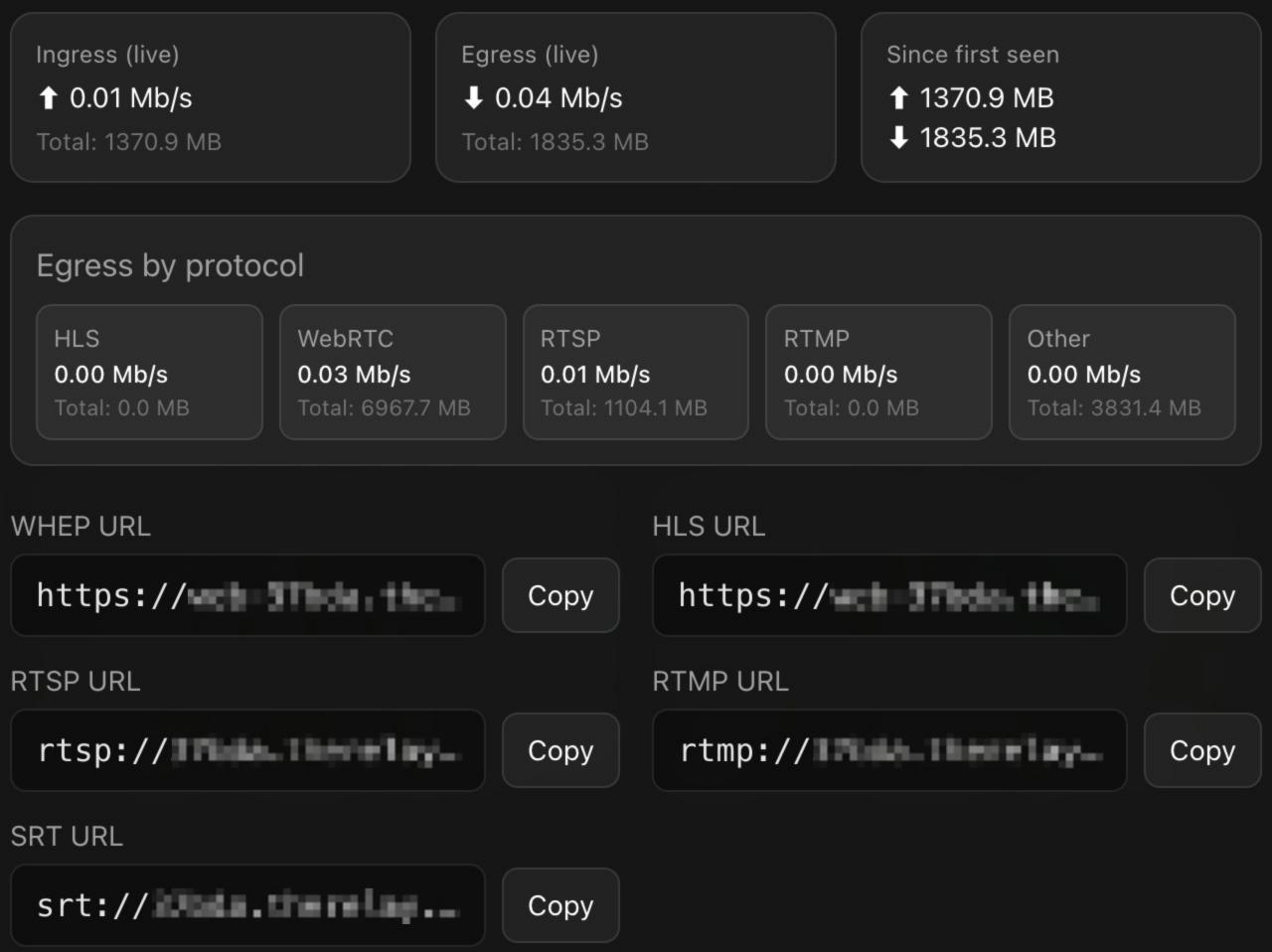
Getting Endpoint URLs
To get endpoint URLs for your cameras:
- Log into TheRelay Dashboard
- Navigate to Cameras section
- Click on desired camera
- Look for "Stream Endpoints" section
- Copy desired protocol endpoint
- Add access token if not already included
Endpoint Security
- Always include access token in endpoint URL
- Tokens restrict which cameras can be accessed
- Tokens can be set to expire
- Create separate tokens for different users
- Revoke tokens to disable access instantly
Token in Endpoints
Tokens can be included in endpoints as:
- Query Parameter: endpoint?token=xyz
- URL Fragment: endpoint#token=xyz
- Header: For API clients using Authorization header
Rotating Endpoints
If you need to change endpoints:
- Create new tokens with desired permissions
- Update all clients with new endpoint URLs
- Revoke old tokens when transition complete
- Monitor logs for any connection issues
Choosing the Right Protocol
Use WebRTC When...
- You need lowest latency (<1 second)
- Building web-based applications
- Browser playback is primary use case
- Users expect real-time interaction
Use RTSP When...
- Integrating with existing VMS/NVR systems
- Using standard media players (VLC, etc.)
- Need maximum compatibility
- Have stable, reliable network connections
Use SRT When...
- Encryption is required for compliance
- Network conditions are unreliable
- Using professional streaming software
- Need to transmit over untrusted networks
Use HLS When...
- Streaming to many concurrent viewers
- Mobile viewing is important
- Want to leverage CDN for distribution
- Acceptable latency is 10-30 seconds
Use RTMP When...
- Need to record/archive streams
- Integrating with broadcasting systems
- Using OBS or streaming software
- Streaming to social media platforms