TheRelay Dashboard Overview
TheRelay Dashboard
The TheRelay Dashboard is your central hub for managing all aspects of your RTSP streaming infrastructure. Monitor camera streams in real-time, manage agents, create tokens, and access configuration settings.
Main Features
- Real-time camera stream monitoring
- Agent management and status
- Token and access control management
- Performance metrics and analytics
- Stream endpoint configuration
- Comprehensive activity logging
Dashboard Sections
- Overview - At-a-glance system status
- Cameras - View and manage streams
- Agents - Monitor publishing agents
- Tokens - Access control management
- Settings - Account and security config
- Logs - Activity and event history
Overview Dashboard
The Overview dashboard provides a quick status of your entire TheRelay deployment.
Status Indicators
- System Health: Overall connectivity and performance
- Active Agents: Number of connected agents reporting streams
- Active Cameras: Total streams currently being published
- Cloud Endpoints: Available access methods (WebRTC, RTSP, HLS, RTMP, SRT)
- Total Bandwidth: Combined bitrate of all active streams
Quick Actions
From the Overview, you can quickly:
- View all agents at a glance with status
- See cameras grouped by agent
- Access stream endpoints directly
- Create new tokens for access control
- Launch agent configuration wizards
Recent Activity
View recent events on your account:
- New camera additions
- Agent connections and disconnections
- Stream availability changes
- Token creation and revocation
- Access patterns and usage
Cameras View
The Cameras section displays all your published camera streams with detailed status and control options.
Camera List
For each camera, you can see:
- Camera Name: User-defined friendly name
- Agent: Which agent is publishing the stream
- Status: Connected/Offline/Error status with uptime
- Bitrate: Current stream bitrate
- Resolution: Video resolution and frame rate
- Duration: How long stream has been active
Camera Controls
Click on any camera to access:
- Live Preview: Watch the stream in dashboard
- Stream Endpoints: Get WebRTC/RTSP/HLS/RTMP/SRT URLs
- Configuration: Edit camera settings
- Tokens: Create tokens for this camera
- Metrics: View detailed performance data
- History: Review connection history and logs
Stream Search and Filter
- Search by camera name or IP address
- Filter by agent
- Filter by status (online/offline)
- Sort by name, status, or bitrate
Metrics and Performance Monitoring
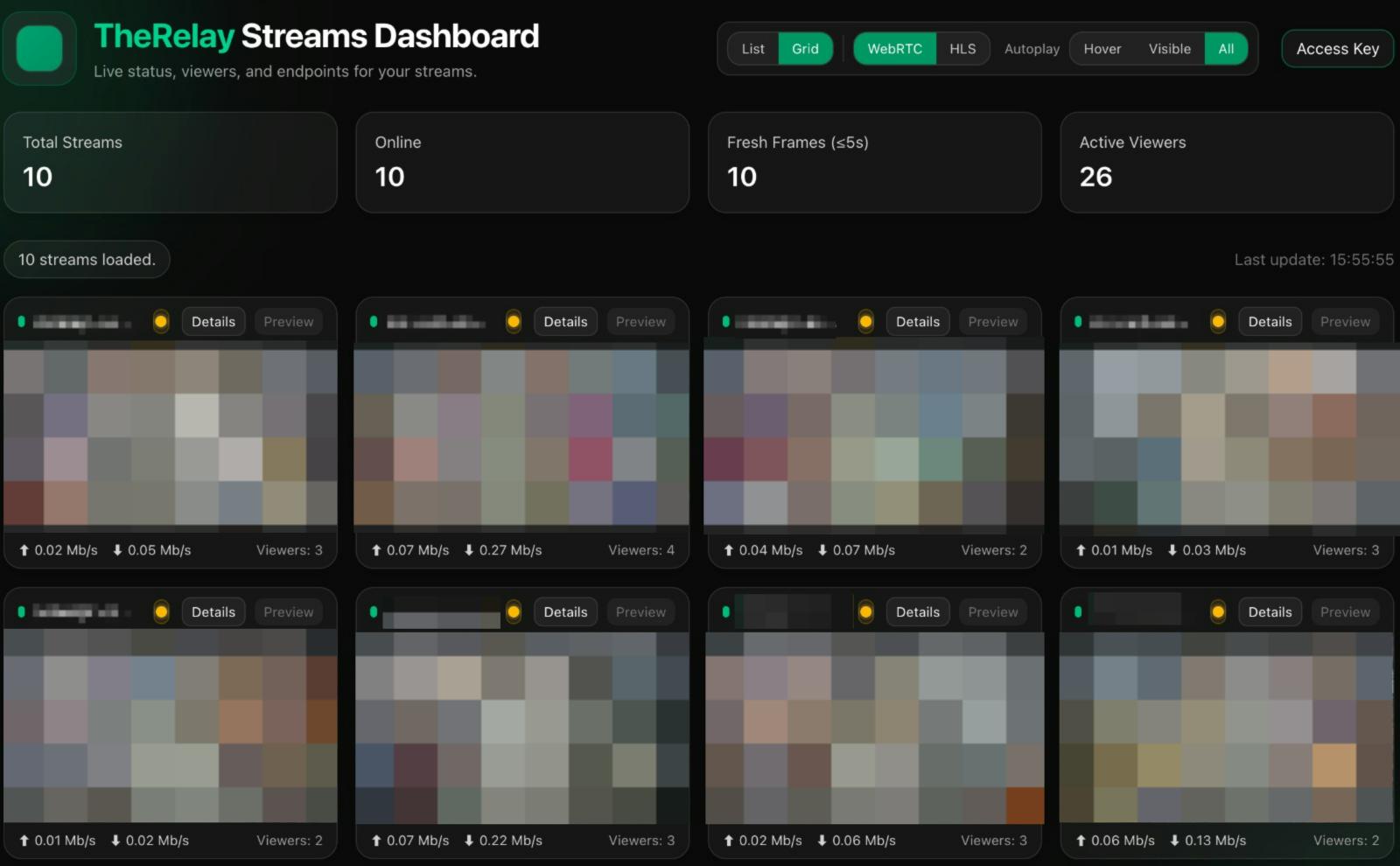
TheRelay Dashboard provides detailed performance metrics for all your streams.
Stream Metrics
- Bitrate: Current encoding bitrate
- Frame Rate: Frames per second
- Resolution: Video resolution
- Codec: Video compression format
- Connections: Number of active viewers
Agent Metrics
- CPU Usage: Agent process CPU consumption
- Memory Usage: Agent RAM consumption
- Network I/O: Incoming and outgoing bandwidth
- Reconnections: How many times agent reconnected to cloud
- Error Count: Number of failures or issues
Health Indicators
Dashboard shows health status with color coding:
- Green: All systems operational
- Yellow: Minor issues or degraded performance
- Red: Critical issue or offline
- Click for details on what issues detected
Agents Management
Manage all your TheRelay Agents from the Agents section of the dashboard.
Agent List
View all installed agents with:
- Agent name and ID
- Connection status and uptime
- Operating system (Windows/Linux)
- Number of streams published
- Last check-in time
- Software version
Agent Details
Click an agent to see:
- Detailed status and connection logs
- Cameras published by this agent
- Performance metrics (CPU, memory, network)
- Recent reconnection events
- Configuration options and settings
Agent Actions
- Restart agent service
- Download configuration files
- Update agent software
- Review and update camera list
- Configure security settings
- Remove agent from account
Dashboard Settings
Configure your TheRelay account and preferences from the Settings section.
Account Settings
- Account name and contact information
- Email and notification preferences
- Two-factor authentication setup
- Password management
- Billing and subscription information
Security Settings
- API key management
- Session management
- Access logs and audit trail
- IP whitelist configuration
- Single sign-on (SSO) setup if available
Integration Settings
- VMS integrations (HikCentral, etc.)
- Third-party API connections
- Webhook configurations
- ONVIF discovery settings
Common Dashboard Tasks
Adding a New Camera
- Go to Cameras section
- Click "+ Add Camera"
- Select agent to publish from
- Enter camera name and RTSP URL
- Enter camera credentials
- Click Save and verify connection
Creating an Access Token
- Navigate to Tokens section
- Click "Create Access Token"
- Select camera or scope
- Set optional expiration
- Generate and copy token
- Share token with authorized users
Getting Stream Endpoint
- Click on a camera in Cameras view
- Look for "Stream Endpoints" section
- Copy desired protocol endpoint (WebRTC, RTSP, HLS, etc.)
- Use endpoint with appropriate access token
Monitoring Stream Health
- Go to Cameras section
- Review status indicators for each camera
- Click camera for detailed metrics
- Check reconnection logs and errors
- Set up alerts for offline cameras if available